ISO
ISO  HIPAA
HIPAA  GDPR
GDPR 
Microsoft 365 email signature management at scale
One dashboard. Every employee. Every email. IT stays in control. Marketing gets a new channel.
- Brand-consistent signatures, auto-applied to every employee’s email. No IT tickets, no chasing people.
- Legal disclaimers, compliance controls, and per-department rules. All managed from one place.
- Turn every email into a trackable marketing touchpoint with clickable banner campaigns.
Trusted by businesses across the globe






Everything IT needs. Everything marketing wants.
Drag and drop signature templates
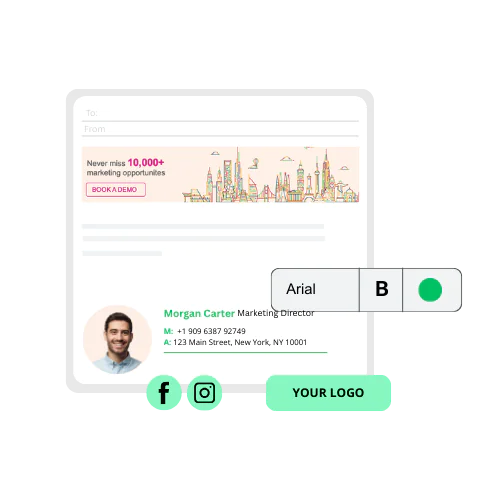
Choose from templates or start from scratch. Add your logo, brand colors, social icons, and contact fields, or let our design team build it for you. Every signature renders correctly on Outlook desktop, OWA, and mobile.
Centralized admin dashboard
Manage signatures for your entire Microsoft 365 organization from a single control panel. Apply changes company-wide in one click. Employees never need to touch their own settings.
Azure AD / Entra ID sync
Rocketseed connects to your Azure Active Directory (Entra ID) and pulls employee names, titles, phone numbers, and departments automatically. When details change, their signature updates. No manual updates required.
Compliance & legal disclaimers
Add personalized, timestamped disclaimers to every outgoing email. Rocketseed supports GDPR, HIPAA, and industry-specific regulatory requirements, backed by ISO 27001 certified infrastructure.
Email banner marketing & analytics
Turn every email into a marketing channel. Add clickable banners, run A/B tests, target and schedule campaigns by department or audience, and track click-through rates and engagement in real time.
CRM & analytics integration
Connect Rocketseed to Salesforce, HubSpot, or Google Analytics to attribute website visits and conversions back to your email signatures. See which banners drive actual leads and tailor future campaigns.
What our customers say
Your IT team will approve it.
Your security team won’t block it.
Rocketseed is built for enterprise infosec review.
ISO 27001 certified datacenters with firewall-protected servers
Regular penetration testing and continuous monitoring
TLS-encrypted mail flow, end to end
How it works
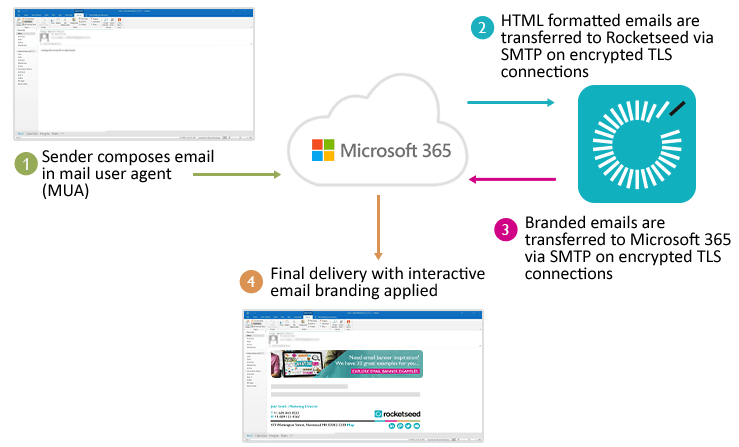
1. Connect once. Link Rocketseed to your Microsoft 365 tenant and Azure AD through our secure web interface. No agent installs, no desktop software to deploy.
2. Send as normal. When an employee hits send, Microsoft 365 routes the email through Rocketseed’s servers to apply the correct branded signature automatically.
3. Delivered with control. The branded email is resubmitted to Microsoft 365 via a TLS-encrypted, closed SMTP loop. Your mail never leaves the Microsoft ecosystem without encryption.
Already using Office 365? See our step-by-step Office 365 email signature setup guide.
Simple pricing. Everything included.
From ~$1.25 / user / month
Annual billing · Full feature set on every plan
Many email signature platforms reserve campaign features, analytics, or advanced integrations for higher-priced tiers. Rocketseed includes everything in one plan. No tiered feature lockouts.
- Centralized signature management, banner marketing, analytics, CRM integrations, and 24/7 human support Annual or monthly billing (monthly available for 50+ users)
- One-time setup fee covers technical integration, custom signature design, and team training
- Built for teams of 40+, with custom pricing for 200+
- 14-day free trial for teams of 50+
- Non-profit, education, and government discounts available

FAQ's
Microsoft 365 email signature management software lets IT and marketing teams create, manage, and automatically apply branded email signatures to every outgoing email in your organization, without employees needing to configure anything themselves. Rocketseed applies signatures server-side, so they’re consistent across Outlook desktop, OWA, and mobile regardless of what device employees use.
Rocketseed is built for organizations of 40 or more on Microsoft 365. IT administrators use it to centrally control signatures, enforce compliance, and eliminate manual updates. Marketing teams use it to run banner campaigns and track engagement without depending on IT. Both use it daily.
Yes. Rocketseed is designed to give IT teams full control over deployment, security, and compliance, while enabling marketing teams to manage branding and banner campaigns independently within approved rules.
Most tools apply signatures server-side after you hit send, so employees never see the final result as they write. Rocketseed’s Signature on Compose shows the branded signature directly in the Outlook compose window. When you open a new email, Rocketseed pulls your current signature design and personal details from Azure AD and renders them automatically. What you see is exactly what recipients get.
Yes. Rocketseed integrates with Azure Active Directory (Entra ID) to automatically sync user data such as names, job titles, departments, and contact details directly from Microsoft 365. This ensures signatures stay accurate and up to date without manual input.
Yes. Rocketseed ensures 100% signature consistency across Outlook desktop, Outlook Web App (OWA), and mobile email clients, including iOS and Android. Server-side deployment removes formatting issues commonly caused by device or client differences.
Yes. Rocketseed supports GDPR, HIPAA, and industry-specific regulatory requirements. Legal
disclaimers are added automatically to every outgoing email and can be customized by department or user group. The platform runs on ISO 27001 certified infrastructure with TLS- encrypted mail flow and tamper-proof signature controls.
Yes. In Rocketseed, you set rules centrally — by department, team, user group, individual sender, location, or internal vs external recipients. Each group gets the right signature automatically. Employees configure nothing.
Yes. Rocketseed supports rule-based signature deployment, allowing signatures to be applied based on departments, roles, locations, or internal vs external recipients. All rules are managed centrally through the admin dashboard.
No. Rocketseed connects via native Microsoft 365 connectors and transport rules, not desktop plugins. When Microsoft updates the platform, signature delivery isn’t affected. Our team monitors compatibility continuously and has maintained uninterrupted service through all major Microsoft 365 updates.
You can configure a shorter, simplified signature for replies and forwards, separate from the full signature on new emails. All managed centrally. Employees switch nothing manually.
Yes. You can start a free trial to test Rocketseed within your own Microsoft 365 environment and evaluate features such as deployment, signature consistency, and banner performance before full rollout.
Most organizations are live within a few days. Setup involves connecting Rocketseed to your Microsoft 365 tenant and Azure AD through our secure web interface. No agent installs, no desktop software to deploy. Our team handles the technical integration, signature design, and team training as part of the onboarding process.
Rocketseed provides 24/7 technical support and a dedicated account manager for every customer. Support is handled by a real team, not a ticketing queue. For organizations that prefer a completely hands-off approach, a fully managed service is also available (See below).
Yes. Rocketseed’s partner program is open to agencies, MSPs, and IT service providers. Partners earn 25% on every deal. Contact our partnerships team
Yes. Rocketseed offers a fully managed service where our team handles setup, signature design, campaign management, and ongoing support. This suits larger organizations or teams that want the benefits without managing the platform themselves. Contact us